
Searching Cumberland County Civil Dockets
Cumberland runs on eCourts. The public entry point is therefore the statewide NC eCourts Portal. It is not a county-built civil database. Smart Search pulls up the public Cumberland Case Summary or Register of Actions. It covers records the system supports. Got a case number? Use it first. Otherwise the default search works by case number or party name. Once results come back, Advanced Filtering trims a statewide list by Cumberland location, case type, status, filing-date range, or supported party and business criteria.
The case-type filter helps. It sorts Civil General, Civil Magistrate, Civil Foreclosure, Summary Ejectment, bond forfeiture, confession of judgment, and non-domestic restraining-order entries apart. Remember that these are just filter choices. They do not promise that every document in a category is public.
Cumberland Civil Dockets: District Court, Superior Court, or Magistrate?
North Carolina keeps one Clerk record path for the county but several civil forums. District Court generally hears civil claims of $25,000 or less. Superior Court takes the matters above that line. Magistrates handle the small-claims cases assigned to them. Those stop at a $10,000 ceiling. Estates and special proceedings run through the Cumberland County Clerk/Superior Court function. Family cases land in District Court, and they may carry extra privacy limits.
| Cumberland civil forum | Documented role | Search and record path |
|---|---|---|
| District Court | Generally civil actions at or below $25,000, plus family matters in its jurisdiction. | Portal Case Summary, hearing search, civil calendar, then Cumberland Clerk. |
| Superior Court | Generally civil actions above $25,000. | Portal Case Summary and the Cumberland County Clerk’s local court file. |
| Magistrate | Small claims up to $10,000 and limited assigned relief. | Part of the same District Court and Clerk access chain. |
G.S. 7A-243 supplies the civil division threshold.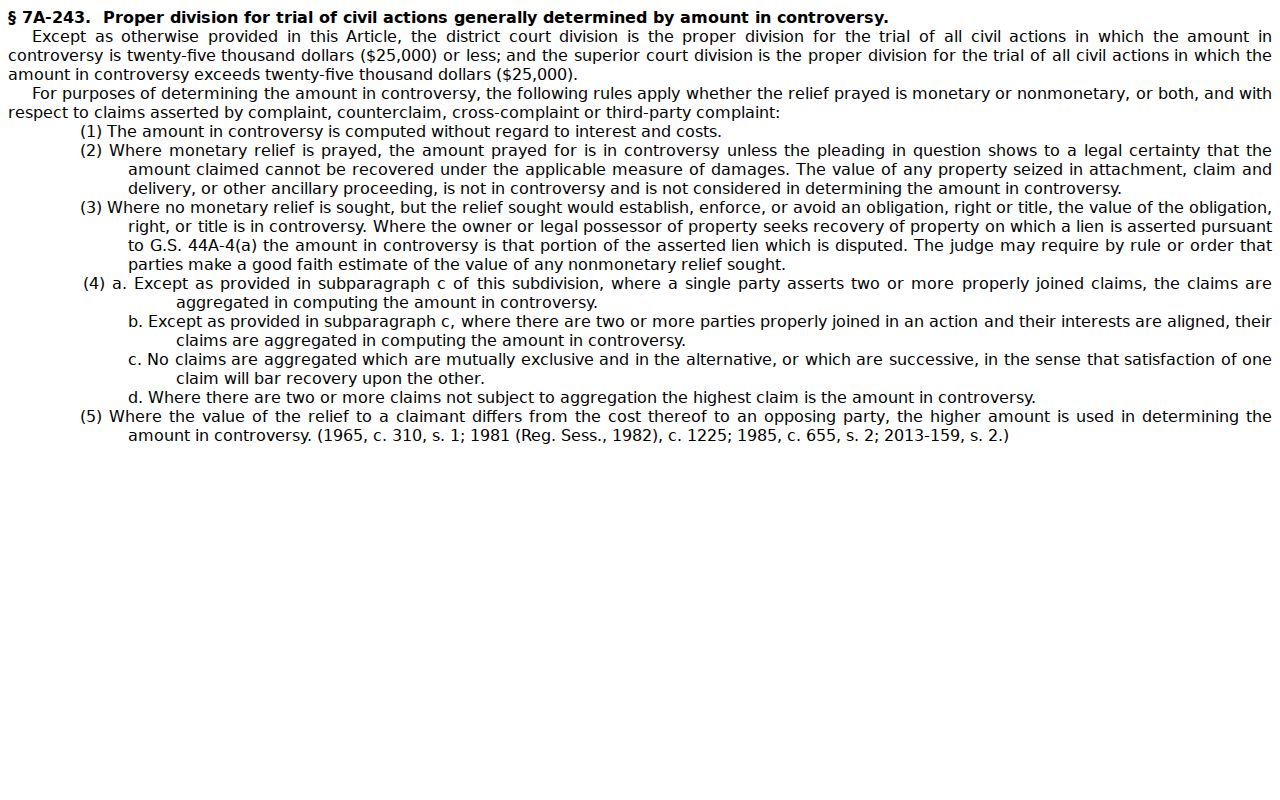
The dollar line helps a reader understand the assignment shown in the Cumberland case history without inventing a separate county civil court.
Inside a Cumberland County Civil Docket
The Portal's public Case Summary for a civil case may show Case Information, Assignment Information, Party Information, Causes of Action, Case Events, Dispositions, Hearings, and Financial Information. They appear when they apply. Each block answers a different question. The caption and cause of action tell you what the case is about. Case Events give the timeline. Hearings point to a setting. Dispositions record a conclusion. One caution applies here. A portal status or judgment-index entry never replaces a signed judgment. Nor does it replace a payoff figure confirmed by the Cumberland County Clerk.
| Record number | The public Enterprise Justice identifier returned in results and Case Information. |
|---|---|
| Assignment information | Division or assignment context where displayed, which helps identify District, Superior, or magistrate-connected handling. |
| Party and cause information | Parties and, for Civil, Family, Probate, and Mental Health matters where applicable, the Cumberland County eCourts Portal’s Causes of Action category. |
| Case Events and Hearings | Chronological public activity and scheduled settings. Use Search Hearings again for a current date or location. |
| Disposition and documents | A recorded resolution and available public documents. Documents can be restricted, delayed by processing, or noncertified. |
What Causes of Action Adds to a Cumberland Civil Case Summary
Causes of Action is the civil-specific Portal category worth a closer look. Where it applies, it adds legal-issue context for Civil, Family, Probate, and Mental Health matters. It is still no stand-in for the pleadings or evidence sitting in the Clerk's file. Read it beside the Cumberland case type. Read it beside the parties, the event chronology, and the disposition too. A caption alone never tells the whole procedural story.
The Judicial Branch civil activity report provides county-level aggregate filing and disposition context.
Aggregate statistics describe workload, whereas the Cumberland case summary is the place to examine one public Cumberland record’s events and setting.
Civil Case Types on the Docket
Treat the eCourts Portal's case-type filtering as a narrowing aid, not a verdict on confidentiality or which images are available. Civil matters can sit in different categories and court divisions. When the online display comes up short, the Cumberland County Clerk still holds the official file.
- Civil General and Civil Magistrate entries can be selected as civil-focused Portal categories.
- Civil Foreclosure, including the documented CV and M filter labels, can be narrowed in the Cumberland County eCourts Portal.
- Summary Ejectment, Non-Domestic Restraining Orders, Bond Forfeiture, and Confession of Judgment are documented choices.
- Family, probate, and mental-health context may use Causes of Action where applicable, with protected material subject to access rules.
G.S. 7A-210 sets the small-claims ceiling.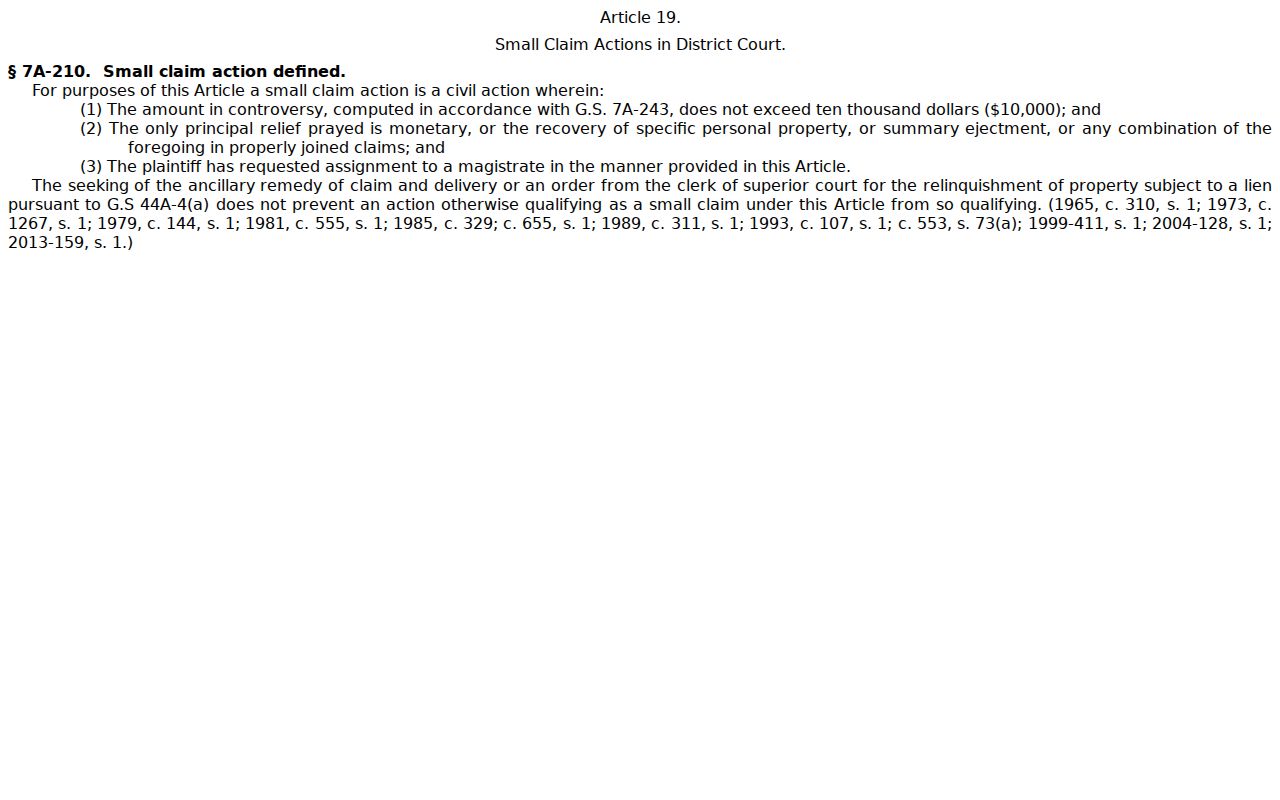
The magistrate small-claims path remains within the unified Cumberland District Court and Clerk record system.
Cumberland’s Time-Certain Civil Superior Motion Settings
Cumberland's Civil Superior Notice of Motion Hearing form routes scheduling through the Trial Court Administrator. The TCA sets these hearings time certain. The form lists the file, the parties, the motion, and a proposed hearing date and time. It also lists the location, the expected length, and service details. One timing note matters for docket searchers. The TCA adds the Cumberland hearing to the eCourts Portal calendar on the Thursday before the session. An earlier search can easily miss a setting published later.
For Civil Superior scheduling, call (910) 475-3018, option 3. General Civil Superior questions go to (910) 475-3261. The form also references File & Serve. That is the attorney filing system, not a public docket tool.
Civil District non-domestic motions follow a related but separate path. Scheduling runs through (910) 475-3018, option 2, and Civil District questions go to (910) 475-3262. That form has fields for the case-specific date, time, and place. It too says the setting hits Portal by the Thursday before session. A sample 9:00 a.m. time and Cumberland courtroom 3E printed in the form is just an example. It is not the universal Cumberland setting. For any particular civil matter, trust the filed notice, the Portal hearing result, and the current calendar.
Civil Docket Settings and Hearings
Need a date, time, Cumberland courtroom, or judicial officer? Use Portal Search Hearings once you have the case identified. Cumberland also posts civil calendars through the Judicial Branch calendar service. Each source answers a different question. The Case Summary gives chronology, and Search Hearings is the live setting lookup. A published Cumberland court calendar lists sessions that can change. Civil District non-domestic materials follow the same pattern. They add hearings to Portal Thursday before session, with scheduling through TCA, option 2.
The county's general-civil plan adds one more local rule. The Trial Court Administrator sets and maintains the District general-civil disposition calendar. It runs under the Chief District Court Judge's supervision. General civil sessions usually run monthly. Written trial notice arrives at least four weeks before trial, and final case or motion calendars post Thursday before session. That timing is why a second search close to the session makes sense. It also marks the line between a session calendar and a case-specific order or notice of hearing.
Cumberland’s civil calendar service supplies the published civil-calendar channel.
Check the current Cumberland hearing information again when a date is important because the Cumberland court, not a saved calendar view, controls the setting.
Why a Cumberland Civil Disposition Is Not a Certified Judgment
A disposition line in a public Case Summary tells you the case ended on the record. That is all it tells you. It does not carry the full legal detail of a signed order or judgment, so treat it as a signal rather than the final word.
NC Judgment Search has its own limits. It is an index, not a payoff statement and not a certified copy. When you need the actual local record, a missing public document, or certification, go through the Cumberland Clerk. Clerk staff can walk you through record products and copy procedures. What they cannot do is give legal advice about what a judgment means.
Civil Docket Access Rules
Inspection by the public is the default for clerk records. A law or a court restriction can change that, but only then. Portal access runs narrower than the counter. Juvenile matters, sealed or expunged cases, protected domestic-violence data, and some family-related information never appear as ordinary web results.
So what does a blank screen prove? Nothing. A no-result screen is not proof that a case never existed, since a record may be restricted, historical, or simply incomplete online. Note the privacy masking: date of birth is hidden in public results, and Social Security number validation is unavailable.
Clerk fallback: G.S. 7A-109 supports public inspection of Clerk-maintained records except where law prohibits it. For public file inspection, copies, or a certified product, contact the Cumberland County Clerk of Superior Court at the Braswell Courthouse, 117 Dick St., Fayetteville, or call (910) 475-3000.
From a Cumberland Civil Case Summary to the Cumberland County Clerk’s File
A Cumberland civil record request works best in sequence. Gather a Cumberland case number, the Cumberland court division, and the party context first. Then read the Cumberland Case Summary, the hearing result, and the civil calendar. From there the path runs through the Cumberland Clerk terminal to the paper file and the copy product. Each detail tells the Cumberland County Clerk whether to pull a public image, a public file, or an official certified record.
When an online result does not answer the question, bring the record number, division, and filing context to the Cumberland County Clerk. Cumberland public terminals cover civil, special-proceeding, and estate information. The local office keeps the paper file and copy path, and staff may provide copies for a fee. One routing note matters here. For court case documents, do not send a request through NCAOC's administrative public-record form; the Judicial Branch says county clerks hold court case documents.
Timing on the Cumberland County eCourts Portal can lag. Public information may appear before every document image does, because upload volume and processing affect display. Once an image is public, you can open or download it, yet an online image is still not an official copy. If a judgment, motion, exhibit, or older paper record is not visible, use the Cumberland County Clerk route instead of assuming no document exists. The clerk can also sort out the difference between an ordinary copy, a certificate under seal, and an exemplification. Each carries a separate statutory fee category.
The official court-records guidance walks through the terminal, paper-file, and copy route in full. At the counter, bring the Cumberland case number and a precise request. Confirm the material is public and whether you need certification. Ask the actual per-page total before ordering copies. A specific request lets staff identify the correct public file product. When the case number is unknown, bring party names, division information, and filing context, because staff must locate the particular local file rather than reconstruct an unspecified civil search. After a public Cumberland County eCourts Portal search, use the clerk for the local official-file question, not as a stand-in for basic online case history or legal advice.